* All the code you need: PHP calendars, WordPress plugins, CSS animations and effects... CodeCanyon’s library is huge! Whatever kind of scripts and plugins you need, you’ll find plenty in our collection. * Know your plugins: Not sure if that JavaScript form is right for you? Check out item reviews left by other users. Plus, you can use collections to save and share your favourite files while browsing.

Translate

800X90_01 800x90-Anim
Showing posts with label woocommerce. Show all posts

WooCommerce Booking & Reservation Plugin

DOWNLOAD AND PREVIEW: WooCommerce Booking & Reservation Plugin


WooCommerce Bookings and Reservations plugin empower your customers to reserve your products and services online. You can add multiple bookable products with price and availability to let the customers book a duration of their choice. With the help of a booking calendar, customers can quickly select days to reserve a product. Create extra free or paid services and assign them to products for maximizing the revenue of your website.
  • Allow Booking & Reservation for Products & Services
  • Set Fixed or Customer Defined Reservation
  • Show Free and Optional Services Upfront
  • Dynamic Pricing for Various Person Types
  • Display Location Using Google Map
  • Determine Price Range for Persons, Person Types, and Rooms
  • Send Booking Notifications to Customers Via Email
  • Allow Customers to Book More than one Room
  • Booking Calendar to View all the Bookings
  • Create the Bookings on the Behalf of Customers
  • Compatible with WPML (New)
discount banner \\ \\ \\

Create Bookable Products and Allow Customers to Reserve

WooCommerce booking plugin allows you to add bookable products to your eCommerce website. Examples allow customers to book a hotel room, apartment, guest house etc.
Simple Booking
booking reservation
Person-wise Booking
\\

Create Bookable Services to Generate More Sales

In addition to the bookable products, you can create numerous mandatory & optional bookable services to boost revenues. For example, a hotel can allow customers to book hi-tea and buffets in addition to reserving a room by using WooCommerce hotel booking plugin. Generate more sales by imagining countless scenarios according to the nature of your business.
Bookable services

Set Fixed or Customer Defined Booking Duration

With a Fixed Duration block, you can allow customers to reserve a product in a specific time frame. Whereas customer defined block displays a booking calendar that gives them the freedom to select booking duration of their choice.
\\

Allow/Disallow Customers to Cancel the Booking

Select either the customers can cancel their booking or not. You can also configure validity for cancelling the reservations.
\\

Define Global Availability for All the Products

You can create booking availability for the products and options. You can determine the availability of bookable products in ranges of months, days, or custom date. By creating global availability, you can configure generalized booking slots for quickly adding them to products.
Global bookable options

Determine Price Ranges for Different Duration, Rooms & Persons

Set a standard price for the bookable product. By creating different price ranges, you can allow discounts for the off-peak hours. For example, set a higher price for the weekends and lower for the weekdays, or swimming pools charge higher in summer season than winter.
\\

Allow Customers to Book Single or Multiple Rooms

You can allow customers to book single or multiple rooms at once. You can set minimum and maximum number of rooms a user can reserve. Define price per room to enable room-wise booking calculation.
\\ \\

Admin can View All Reservations on Bookings Calendar

Click Bookings Calendar from the admin control panel to view date-wise reservations in a calendar. This facilitates merchants in briefly looking at all the bookings.
\\

Allow Person-Wise Reservation of Bookable Products

WooCommerce Bookings and Reservations plugin empowers you to create a bookable product that has persons as well. Let your customers book a product according to their accompanying persons. For example, allow customer to reserve a room for 2 adults and 2 kids.

Set Minimum and Maximum Persons

You can set a minimum and maximum number of persons for booking a product. For example, restrict booking of a room for minimum 1 and maximum 2 adults.

Define Person Types

Create different person types along with name, price, and description to charge your customers properly. Person types can be kids, adult, couple, etc.
\\

Create Bookings on the Behalf of Customers

If customers ask for booking through telephone or email then you can create bookings on their behalf from the admin panel.
Customers booking

Enable Email Notifications and Customize Settings

With WooCommerce Booking and Reservation plugin, you can enable booking notifications to inform the potential buyers in time. You can customize the name and email address of the sender to streamline your communication with the customers.

Add Custom Email Templates

You can draft multiple email templates and configure their sending time. Pre-compose an unlimited number of messages with WYSIWYG editor and add media to them. These email messages can either be sent soon after booking, one day before check-in, or after check-out.
\\

Add Google Map Location to Your Bookable Products

By providing latitude and longitude, you can display the physical location of a bookable product on Google map right on the product page. This facilitates users in reaching out to the exact location with easy map navigation.
\\

Compatible with WPML

WooCommerce booking and reservation plugin is compatible with WPML (WordPress Multilingual Plugin).

Woocommerce Zoho CRM Integration

Have all your customer data synced in your system with one click
Set up hands-free mode with automatic sync and cron job sync
Do not miss any potential transactions
Highly integrate your data with Woocommerce CRM Integration
  • Sync Register customer in Woocommerce to Lead in Zoho CRM
  • Sync Orders in Woocommerce to Account or Contact in Zoho CRM
  • Sync Orders in Woocommerce to Invoices in Zoho CRM
  • Sync Products in Woocommerce to Products in Zoho CRM
Easily manage syncing items
  • Map data fields flexibly in Setting
  • View syncing history for reference
  • Find failed syncing attempts and reject duplicated items

Features

  • Map data fields for Woocommerce Zoho CRM Connector

  • Woocommerce Zoho CRM Integration - 3

  • Sync data immediately from Woocommerce to Zoho CRM

  • Woocommerce Zoho CRM Integration - 4

  • Create Lead in Zoho CRM from register customer in Woocommerce

  • Woocommerce Zoho CRM Integration - 5

  • Create Account and Contact in Zoho CRM from Orders in Woocommerce

  • Woocommerce Zoho CRM Integration - 6

  • View a report

  • Woocommerce Zoho CRM Integration - 7

Reviews from our customers


woocommerce refer a friend review
woocommere refer a friend review 6

WooCommerce International SMS

DOWNLOAD WooCommerce International SMS


WooCommerce International SMS - CodeCanyon Item for Sale

This is a WooCommerce add-on. By Using this plugin admin and customers, can get notification about their order via SMS by using sms gateway
The WooCommerce International SMS plugin for WordPress is very useful when you want to get notified via SMS after placing an order. Buyer and seller both can get SMS notification after an order is placed. SMS notification options can be customized in the admin panel very easily
This plugin not only can send SMS on order updates. you can also send sms from wp admin to any number. soon this plugin will have many integration with other plugins to send updates to buyers
  

Features of this plugin

  • Admin can get Order SMS notifications
  • Buyer can get order sms notifications
  • Available settings for Admin to control SMS settings and gateways
  • Send SMS to any number
  • Directly Contact with buyer via SMS
  • Customizable SMS text
  • Send Order details ( order no, order status, order items, order amount ) in SMS text
  • Different SMS send corresponding to different Order Status

Integrated With

Tested With SMS Gateways :

* Information Will Be Updated Soon…


WooCommerce Custom Product Designer

DOWNLOAD WooCommerce Custom Product Designer


WooCommerce Custom Product Designer - CodeCanyon Item for Sale

WooCommerce Custom Product Designer – Complete business solution for selling custom printing products


SOME OF THE CUSTOMERS REVIEWS


WooCommerce Dynamic Pricing & Discounts

DOWNLOAD WooCommerce Dynamic Pricing & Discounts


WooCommerce Dynamic Pricing & Discounts - CodeCanyon Item for Sale
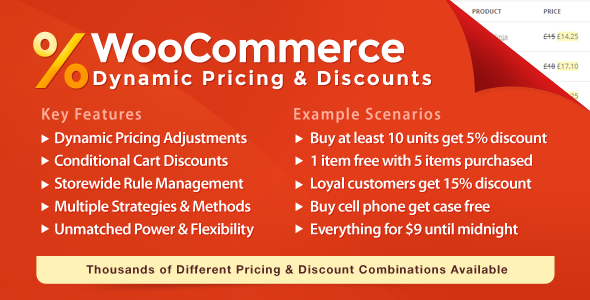
WooCommerce Dynamic Pricing & Discounts lets you manage product pricing rules and cart discounts easily. Features and flexibility are not matched by any alternative.
Boost Your Sales
Sell more! Set up attractive discounts for customers who buy large quantities. Run special Christmas, Easter or Black Friday promotions. Set up clearance or flash sales. All laptops 15% off until midnight. Free case with each cell phone. Using this extension, you can set up the most powerful promotions in minutes!

Increase Customer Loyalty
Create long term pricing strategies to keep your best customers engaged. Reward customers that reach specific lifetime goals (money spent, orders completed). Use one store for both retail and wholesale sales. Start a club and offer insider discounts. Set up discounts for individual clients based on direct agreements.

WooCommerce Dynamic Pricing

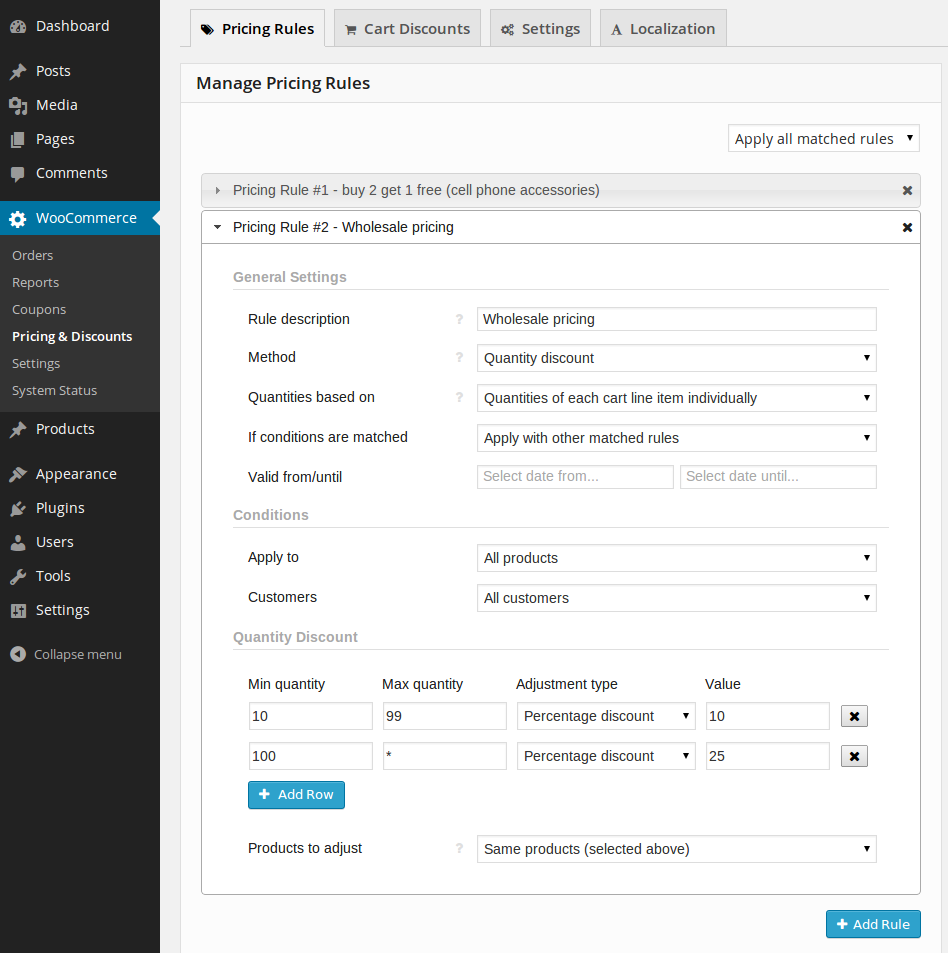
  • Create unlimited pricing rules using a powerful rule editor
  • Control which rules are applied – all, first matched or biggest discount
  • Rule can be applied to all products in store, specific categories or specific products
  • Five different quantity calculation methods to determine pricing tier
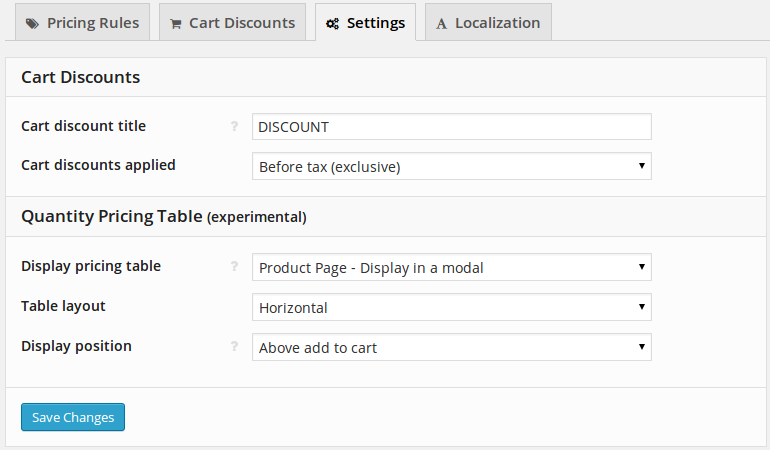
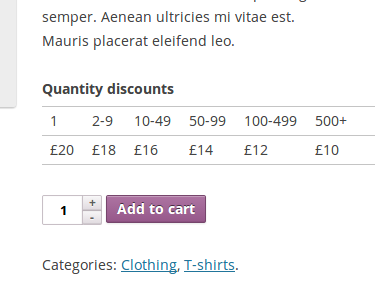
  • Display Quantity Discount pricing table on product pages
  • Pricing table can be displayed inline or in a modal
  • Optionally set promotion start and end dates
Adjustment Methods
  • Quantity Discount – discounts increase with quantity purchased
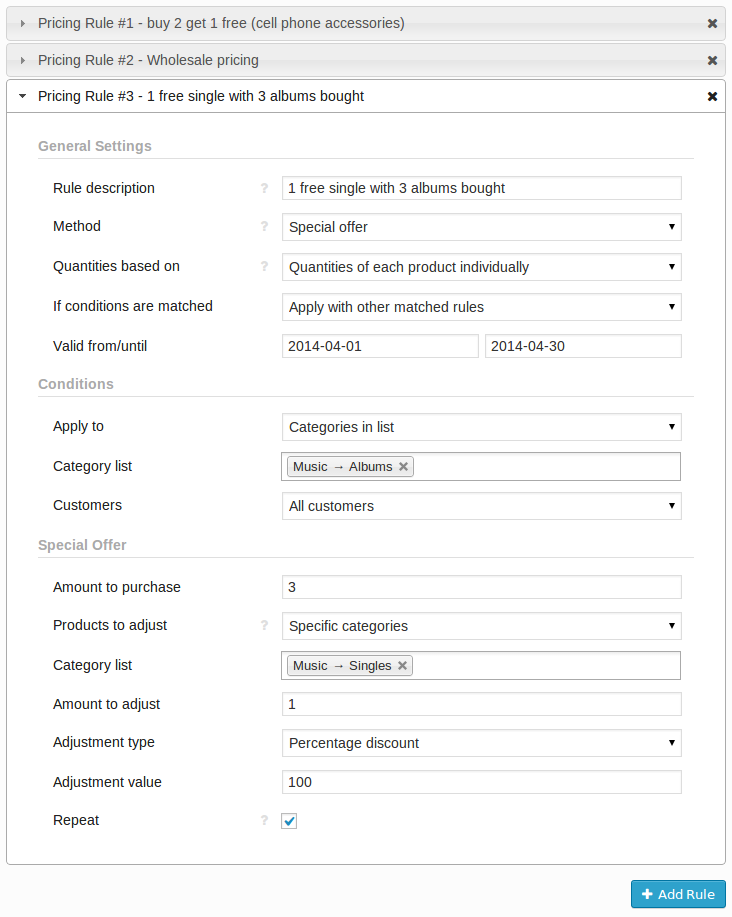
  • Special Offer – specific amount of items purchased discounts other items
  • Exclude matched items – exclude specified items from other, usually more general rules
  • Possible to configure repeating special offer rule (e.g. free frame with each picture purchased)
  • Possible to count quantities of one set of items but apply discount to other item
  • Percentage discount, price discount or fixed price adjustments supported
Conditions
  • Apply To: All products, Categories in list, Categories not in list, Products in list, Products not in list
  • Customers: All customers, Roles in list, Roles not in list, Customers in list, Customers not in list

WooCommerce Cart Discounts

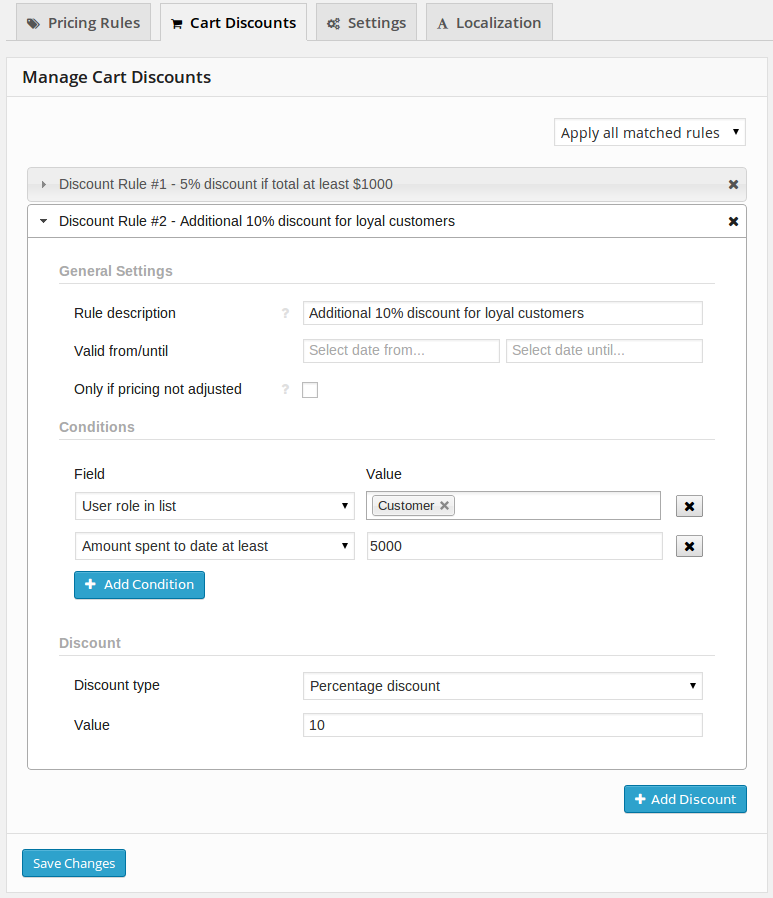
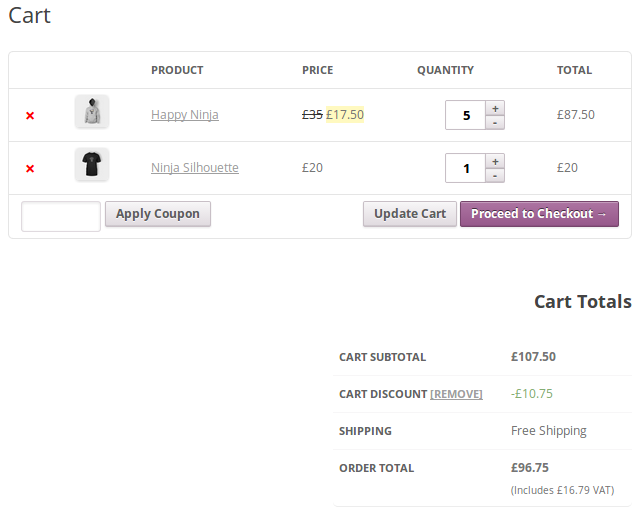
  • Create unlimited conditional cart discount rules
  • Control whether discounts are applied before tax or after tax
  • Control which discounts are applied – all, first matched or biggest discount
  • Apply rule only if cart contains no products with price adjustments
  • Percentage discount and amount discount supported
  • Optionally set discount start and end dates
Conditions
  • Cart Subtotal: Subtotal at least, Subtotal less than
  • Cart Item Count: Count of cart items at least, Count of cart items less than
  • Quantity Sum: Sum of item quantities at least, Sum of item quantities less than
  • Products In Cart: At least one product in cart, None of selected products in cart
  • Categories In Cart: At least one category in cart, None of selected categories in cart
  • Customer Details: User in list, User role in list, Order count to date at least, Amount spent to date at least, Shipping country in list

Virtually Unlimited Scenarios

With this powerful WooCommerce extension you can create almost any promotion that you can imagine!
We know your head is probably spinning with perfect ideas but here’s a few examples of what this plugin can do for you just in case you need a hint:
  • Buy at least 10 units get 5% discount
  • Buy between 2 and 5 units get 10% discount, buy at least 6 get 20% discount
  • With each desktop computer get wireless keyboard with 50% discount
  • Spend at least $1000 get 15% discount on your order
  • iPhone case with each iPhone purchased
  • Get $5 cart discount if you purchase anything from category Clothing
  • Everything for $9 until midnight but only if you purchase at least 3 items
  • This month all music albums 10% off, singles 25% off
  • 5% discount if no other discount is applied
  • 5% lifetime discount after your 10th order, 10% after 50th
  • VIP club members get 25% cart discount on all items
  • Give 10% discount on laptops but only if customer is not VIP club member
  • Users with role Shop manager get 100% discount for testing purposes
  • And almost any other dynamic pricing and conditional discount scenario that you can imagine!

What Users Say